AIR-AP1852E-H-K9C is one of the Cisco Aironet 1850 Series Access Points. Cisco 1850 AP series is ideal for small and medium-sized networks. This series supports enterprise-class 4x4 MIMO, four-spatial-stream access points that support the IEEE’s new 802.11ac Wave 2 specification. The 1850 Series extends support to a new generation of Wi-Fi clients, such as smartphones, tablets, and high-performance laptops that have integrated 802.11ac Wave 2 support. The model AIR-AP1852E-H-K9C provides H Regulatory Domain and External antennas. Model number ending in C is, by default, factory-shipped with a Cisco Mobility Express software image.
Quick Specs
Table 1 shows the quick specs of AIR-AP1852E-H-K9C.
Part Number
AIR-AP1852E-H-K9C
Description
802.11ac Wave 2 Access Point, 4x4:4, External-Ant, H Regulatory Domain
★ Model number ending in C is, by default, factory-shipped with a Cisco Mobility Express software image.
Features
- 4x4 MIMO with four spatial streams, single-user MIMO
- 4x4 MIMO with three spatial streams, multiuser MIMO
- 1 x 10/100/1000BASE-T autosensing (RJ-45), Power over Ethernet (PoE)
- 1 x 10/100/1000BASE-T autosensing (RJ-45), AUX (used for Link Aggregation)
- Management console port (RJ-45)
- USB 2.0 (enabled via future software)
Dimensions (W x L x H)
8.3 x 8.3 x 2 in. (210.8 x 210.8 x 50.8 mm)
Weight
3.12 lb (1.41 kg)
Product Details
Figure 1 shows the AIR-AP1852E LED Indicator Position.
Note:
①
LED indicator position
②
External Antenna
There are four external antennas installed with the AP.
Table 2 shows the AP LED indicators’ descriptions.
Message Type
LED State
Message Meaning
Association status
Chirping Green
Normal operating condition, but no wireless client associated
Green
Normal operating condition, at least one wireless client association
Boot loader status
Green
Executing boot loader
Boot loader error
Red
Boot loader signing verification failure
Access point
regulatory domain
priming status
Blinking Amber
AP priming to a new regulatory domain by Neighbor Discovery Protocol (NDP), in progress
Cycling Red, Green and off
AP waiting to be primed
Chirping Red
AP primed to a wrong regulatory domain
Operating status
Blinking amber
Software upgrade in progress
Cycling through green, red, and amber
Discovery/join process in progress
Rapidly cycling through red, green, amber, and off.
Access point location command invoked from controller web interface.
Access point operating
system errors
Cycling through red, green, amber, and off
General warning; insufficient inline power
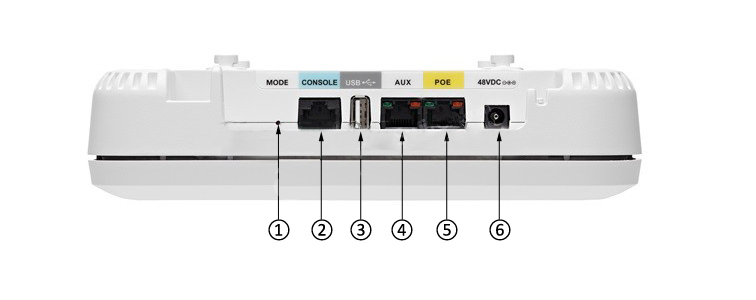
Figure 2 shows AIR-AP1852E Ports and Connections.
Note:
①
Mode button
④
AUX (Auxiliary) port.
②
RJ-45 console port
⑤
PoE-In port (Ethernet Uplink port)
③
USB 2.0 port
⑥
48 V DC input power port
AUX (Auxiliary) port appears in the wireless controller user interface as GigabitEthernet1. This port, along with the PoE-In port, is used for Link Aggregation. This port is disabled when using 802.3af (15.4W) power.
Compare to Similar Items
Table 3 shows the comparison between two AP.
Part Number
AIR-AP1852E-H-K9
AIR-AP1852E-H-K9C
Description
802.11ac Wave 2 Access Point, 4x4:4
802.11ac Wave 2 Access Point, 4x4:4
★ Model number ending in C is, by default, factory-shipped
with a Cisco Mobility Express software image.
External Antenna
Yes
Yes
Regulatory Domain
H (H regulatory domain):
- 2.412 to 2.472 GHz; 3 channels
- 5.150 to 5.350 GHz; 8 channels
- 5.745 to 5.825 GHz; 5 channels
H (H regulatory domain):
- 2.412 to 2.472 GHz; 3 channels
- 5.150 to 5.350 GHz; 8 channels
- 5.745 to 5.825 GHz; 5 channels
Support & Resources
[PDF] Cisco Indoor Access Points Comparison Chart
Get more information
Do you have any question about the AIR-AP1852E-H-K9C?
2.4 GHz, gain 3 dBi, internal omni, horizontal beamwidth 360°
5 GHz, gain 5 dBi, internal omni, horizontal beamwidth 360°
External antenna (sold separately)
Certified for use with antenna gains up to 6 dBi (2.4 GHz and 5 GHz)
Cisco offers the industry's broadest selection ofantennas, delivering optimal coverage for a variety of deployment scenarios
Interfaces
1 x 10/100/1000BASE-T autosensing (RJ-45), Power over Ethernet (PoE)
1 x 10/100/1000BASE-T autosensing (RJ-45), AUX (used for Link Aggregation)
Management console port (RJ-45)
USB 2.0 (enabled via future software)
Indicators
Status LED indicates boot loader status, association status, operating status, boot loader warnings, boot loader errors
Dimensions
(W x L x H)
Access point (without mounting bracket): 8.3 x 8.3 x 2 in. (210.8 x 210.8 x 50.8 mm)
Weight
3.12 lb (1.41 kg)
Environmental
Cisco Aironet 1850i
Nonoperating (storage) temperature: -22° to 158°F (-30° to 70°C)
Nonoperating (storage) altitude test: 25˚C, 15,000 ft.
Operating temperature: 32° to 104°F (0° to 40°C)
Operating humidity: 10% to 90% (noncondensing)
Operating altitude test: 40˚C, 9843 ft.
Cisco Aironet 1850e
Nonoperating (storage) temperature: -22° to 158°F (-30° to 70°C)
Nonoperating (storage) altitude test: 25˚C, 15,000 ft.
Operating temperature: -4° to 122°F (-20° to 50°C)
Operating humidity: 10% to 90% (noncondensing)
Operating altitude test: 40˚C, 9843 ft.
System memory
1 GB DRAM
256 MB flash
Input power requirements
AP1850: 44 to 57 VDC
Power supply and power injector: 100 to 240 VAC; 50 to 60 Hz
Power draw
20.9W
Note: When deployed using a Power over Ethernet (PoE) specification, the power drawn from the power sourcing equipment will be higher by some amount, depending on the length of the interconnecting cable.
Powering options
802.3at
Enhanced PoE
Cisco power injector, AIR-PWRINJ4=
Cisco local power supply, AIR-PWR-C=
Cisco power injector, AIR-PWRINJ5= (Note:this injector supports 802.3af only)
802.3af
Note: If 802.3af PoE is the source of power, (1) the 1852e 2.4-GHz radio will shift to 2x3 from 3x4, (2) The USB port and AUX Ethernet port are disabled on both the 1852i and 1852e.







 PRODUCTS

)
 AIR-AP1852E-H-K9C
 Goods Description:802.11ac Wave 2 Access Point, 4x4:4, External-Ant, H Regulatory Domain, Configurable

 More…
More…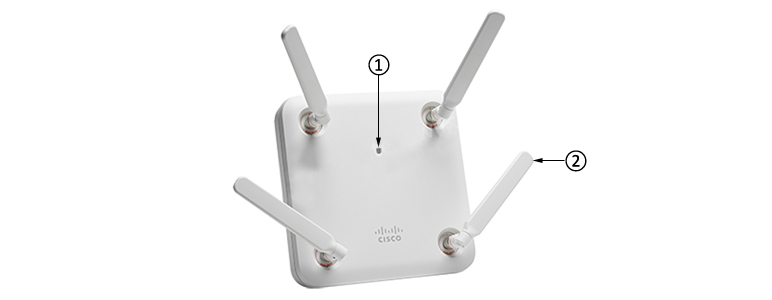
 [PDF] Cisco Indoor Access Points Comparison Chart

