ISR4431-V/K9 integrated router combines high-performance, scalability, VOIP and smart router is made to run multiple services. This is the only router in industry separates control data and services planes, so the benefits are numerous. With pay-as-you-grow performance, you can increase forwarding capacity when needed, you only pay for the performance you need. The ISR4431-V/K9 runs multi-core, multi-threaded advanced Voice IOS-XE operating system to enable both WAN link security and VOIP services. Full featured WAN optimization with that run native on the motherboard without affecting performance, management and other capabilities. According to the scalability, ISR 4431 designed as a layer 7 router basically, the advanced network services enable the branch to utilize the WAN intelligently is really what ISR 4400 series all about. The Cisco ISR 4431 is the ultimate application delivery platform to mid-size or even large branch offices. This is literally routing redefined.
Quick Specs
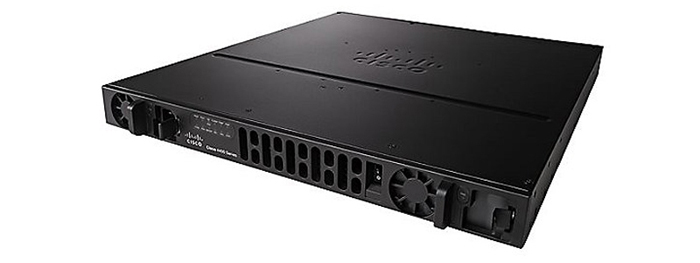
Figure 1 shows the appearance of Cisco ISR4431/K9 for reference. ISR4431-V/K9 is similar with it.
Table 1 shows the Quick Specs.
Product Code
ISR4431-V/K9
Aggregate Throughput
500 Mbps to 1 Gbps
Total onboard WAN or LAN 10/100/1000 ports
4
RJ-45-based ports
4
SFP-based ports
4
Enhanced service-module (SM-X) slot
0
NIM (Network Interface Modules) slots
3
Onboard ISC slot
1
DDRM (data plane)
2 GB (default) / 2 GB (maximum)
DDRM (control/services plane)
4 GB (default) / 16 GB (maximum)
Flash Memory
8 GB (default) / 32 GB (maximum)
Power-supply options
Internal: AC, DC, and PoE
Rack height
1 RU
Dimensions (H x W x D)
43.9 x 438.15 x 507.2 mm
Package Weight
20.88 Kg
Product Details
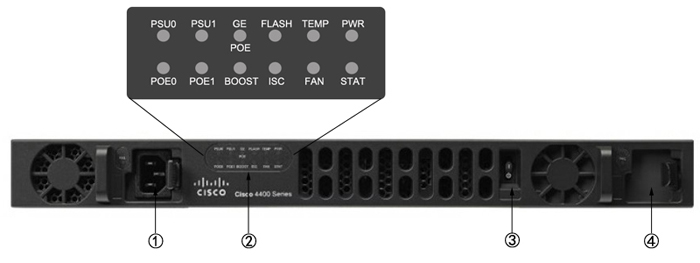
Figure 2 shows the front panel of Cisco ISR4431/K9 for reference. ISR4431-V/K9 is similar with it..
Note:
①
Power supply unit
③
Router power On/Off switch
②
LEDs
④
Optional power supply unit
·LEDs include 12 indicators.
Table 2 shows the LED descriptions.
LEDs
Represents
Color
Description
PSU
Power Supply Unit (P0 and P1) Status
Green
PSU is on and is providing power.
Amber
PSU is on but with errors or in a failure condition.
Off
Power supply is turned off.
GE POE
Internal PoE Daughter Card Status
Green
PSU is installed and providing power
Amber
PSU is installed but in a failure condition.
Off
PSU is off.
FLASH
System Flash Status
Blinking Green
Compact flash/eUSB flash is present and currently being accessed.
TEMP
Temperature Status
Solid green
All temperature sensors in the system are within acceptable range.
Amber
One or more temperature sensors in the system are outside the acceptable range.
Off
Temperature is not being monitored.
PWR
System Power
Green
System power is on and functioning correctly.
Green blinking
System power is in the process of shutting down.
Amber
System power is up, but low level initialization failed.
Amber blinking
System power is up, but the system failed to come out of reset.
Off
System power is off.
POE BOOST
Power Over Ethernet Boost Mode
Green
Two PoE power supplies are installed and operating in boost mode.
Off
This can mean one of the following:
·No PoE PSU installed.
·One PoE PSU installed.
·Two PoE PSUs installed and operating in redundant mode.
ISC
ISC Slot Status
Green
PVDM4 is present and enabled.
Amber
Initialized with error.
Off
Not present.
FAN
Fan Status
Green
All fans are operating.
Amber
One fan has stopped working.
Blinking Amber
Two or more fans have stopped working, or the fan tray has been removed.
Off
Fans are not being monitored.
STAT
System Status
Solid green
System operating normally.
Blinking amber
BIOS/Rommon is booting.
Amber
BIOS/Rommon has completed booting, and system is at Rommon prompt or booting platform software.
Off
System is not out of reset or BIOS image is not loadable.
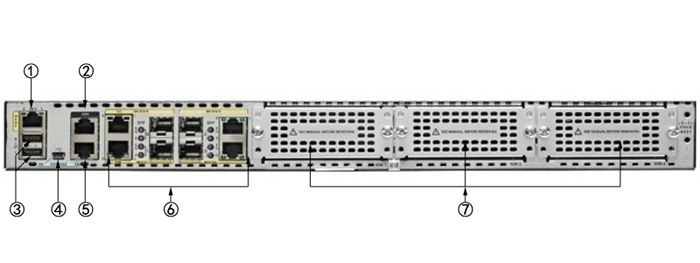
Figure 3 shows the back panel of Cisco ISR4431/K9 for reference. ISR4431-V/K9 is similar with it..
Note:
①
GE management port
⑤
Console port
②
Auxiliary port
⑥
GE Ports
③
USB Type A port
⑦
NIM Slots
④
USB Type B mini port
·The NIMs support 2 single-wide or 1 double-wide.
·The GE Ports include 4 RJ45 ports and 4 SFP ports.
The Modules, Cards, Licenses & Accessories
Table 3 shows some recommended modules, cards, licenses and several cables.
Items
Models
Descriptions
Console and Auxillary Cables
CAB-AUX-RJ45
Cisco CAB-AUX-RJ45 Auxiliary Cable 8ft with RJ45 and DB25M
CAB-ETH-S-RJ45
Cisco Router Cable CAB-ETH-S-RJ45
CAB-CONSOLE-RJ45
Cisco CAB-CONSOLE-RJ45 Console Cable 6ft with RJ45 and DB9F
CAB-CONSOLE-USB
Cisco CAB-CONSOLE-USB Console Cable 6 ft with USB Type A and mini-B







 PRODUCTS

)
 ISR4431-V/K9
 Goods Description:500Mbps-1Gbps system throughput, 4 WAN/LAN ports, 4 SFP ports, multi-Core CPU, Dual-power, Security, Voice, WAAS, Intelligrnt WAN, OnePK, AVC, separate control data and services CPUs

 More…
More…